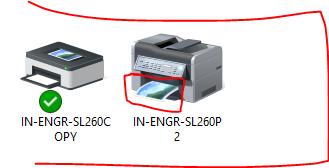
Good afternoon, I'm writing to let you know that we've regained printer connectivity in the SL 260 suite but you most likely don't have these newly IP'd printers in your device list. When you search for them, they will not appear since they are 'private'. Here's instructions on how to get them added: 1. Open email to it@purdue.edu<mailto:it@purdue.edu> 2. Let them know that you're looking to connect to the printers located (below are the device names) in the SL 260 office suite and mention that you are in Indianapolis. * [cid:7b4ad1f9-fee5-4de8-81dd-ebd806848ac5] Also, itindy@purdue.edu<mailto:itindy@purdue.edu> is Indy's specific IT email, but Rob Meagher mentioned in his message during the morning information sessions that he would like IT requests to route through Purdue's main IT line first. He mentioned that you should email itindy@purdue.edu<mailto:itindy@purdue.edu> for emergency IT situations. Sincerely, Zach Sigafoes - Executive Assistant Purdue University Indianapolis zsigafoe@purdue.edu<mailto:zsigafoe@purdue.edu> - 765.495.7703 [cid:20289f56-f5a9-4203-8d50-86e60a070778]